
Why does the month disappear?
Big costs are easy to remember. Rent, a flight, a new phone: you know roughly what they were. A month disappears in small amounts that each feel like nothing at the time, such as a coffee, a lunch, a taxi home or an app renewal.
Your bank statement does not help much. It lists merchants, not purposes, so a supermarket line could be the weekly shop or a bottle of wine for a party. Cash leaves no statement at all. To see where the money went, you need records sorted by what they were for.
1. Pick 10 to 15 categories
Categories need to be broad enough that every spend has an obvious home, and narrow enough that the answer means something. A workable starting set:
- Rent or mortgage, and Bills
- Groceries, Eating out, and Coffee and snacks
- Transport, Health and Clothes
- Subscriptions, Gifts and Other
Keep Eating out apart from Groceries. Together they hide the most useful answer in the whole exercise. Start small and split a category later if it turns out to be large. Forty categories on day one mostly produce forty decisions at the till.
2. Log every spend for a full month
The method works only if the record is complete, and the reliable way to make it complete is to log each spend within a minute of paying. Waiting until the evening means reconstructing the day, and the small cash spends are the first to be forgotten. How to track daily expenses has a routine that takes a few seconds per purchase.
A full calendar month matters. A week misses the monthly bills, and two weeks can land on either side of payday and tell two different stories.
3. Count the fixed costs too
Rent, phone, insurance and subscriptions are charged automatically, so nobody types them in at a till. They are easy to leave out, and they are often the largest slice of the month. Enter each one once as a repeating record so it lands in the right month by itself. How to track recurring bills and subscriptions covers the full list to check.
4. Rank the month
At the end of the month, add up each category and sort them from largest to smallest. Here is a worked month of 2,000 in spending across 60 records:
| Category | Spent | Share | Records |
|---|---|---|---|
| Rent | 800 | 40% | 1 |
| Groceries | 300 | 15% | 9 |
| Eating out | 240 | 12% | 11 |
| Bills | 160 | 8% | 4 |
| Transport | 140 | 7% | 3 |
| Clothes | 100 | 5% | 2 |
| Coffee and snacks | 80 | 4% | 20 |
| Subscriptions | 80 | 4% | 5 |
| Gifts | 60 | 3% | 2 |
| Other | 40 | 2% | 3 |
| Total | 2,000 | 100% | 60 |
Read it from the top. Rent is 40% of the month, but it is a decision you made once, not this month. The interesting rows are further down:
- Eating out plus coffee comes to 320, more than the 300 spent on groceries, across 31 separate records.
- Coffee is only 4% of the money but a third of the records. Twenty small decisions, each easy to wave through.
- Subscriptions look small at 80, until you multiply by twelve and get 960 a year.
5. Compare it with last month
One month can mislead. A birthday, a car repair or a holiday can push any category up. Put two or three months side by side and look for what keeps rising. A category that grows every month is a habit. A one-off spike is just life, and it does not need a plan.
Where WhereItWent fits
WhereItWent does the ranking as you go. The dashboard is a ring with every category in its own slice and colour, and the biggest share is the biggest arc, with its percentage under the category's icon. The month's totals sit in the middle of the ring.
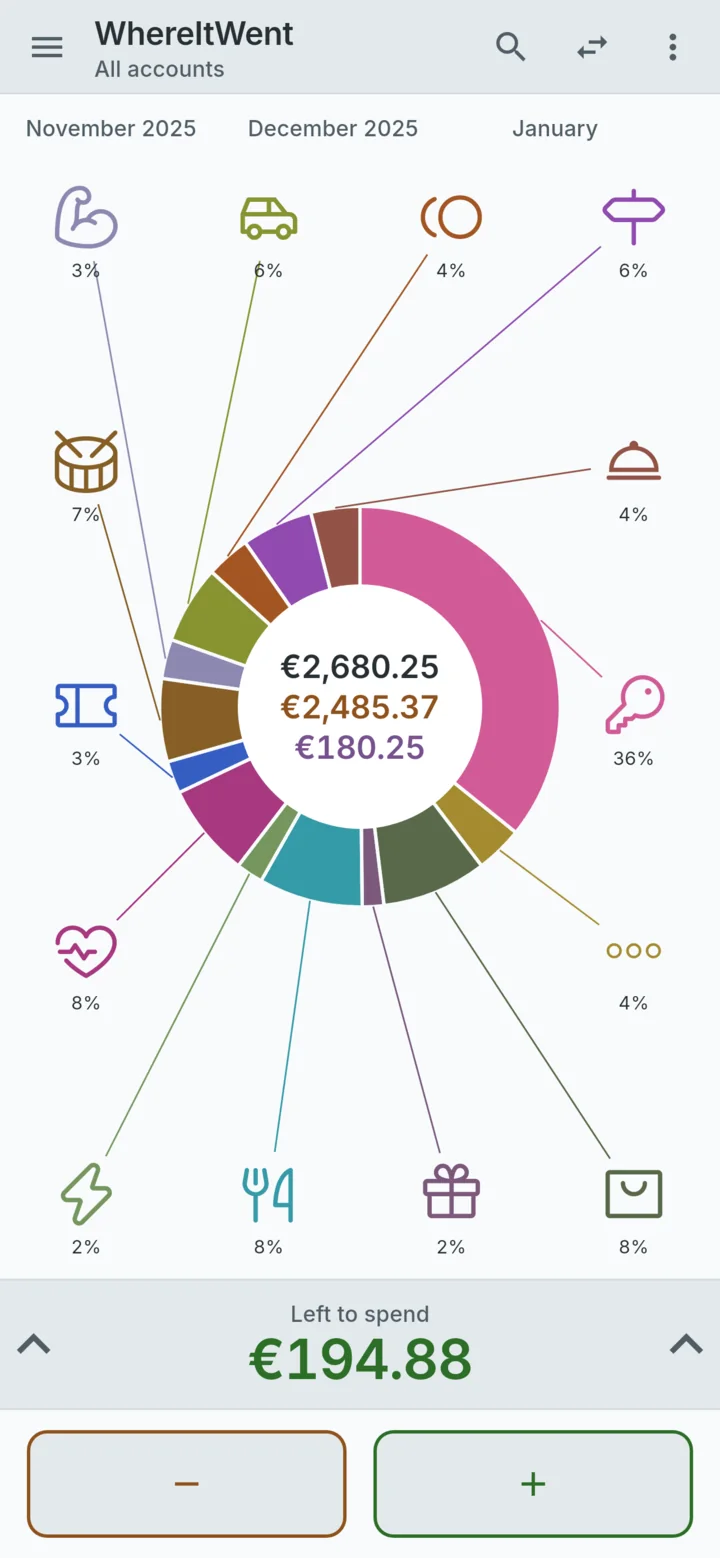
- Hold a category and its total for the period appears in the middle of the ring.
- Swipe the ring sideways for the month before, which makes step 5 a single gesture.
- Pull up the panel for every record in the period, grouped by category or by date, with a total for each day.
- Change the period to a week, a year or a range of your own. If you are paid on the 25th, set the first day of the month to 25 in Settings and every month runs payday to payday.
Transfers between your own accounts, such as card to savings, are not counted as spending, so moving money around does not inflate the month.
What to do with the answer
Change one thing, the category that surprised you, and leave the rest alone for a month. Trying to fix every row at once tends to last about a week. If eating out was the surprise, give it a limit and watch it next month. When you want a limit for the whole month, how to set a monthly budget by category builds one from the numbers you now have.
WhereItWent turns a month of records into one ring, with the biggest share drawn as the biggest arc. Free, offline, no account, no ads.
Get WhereItWent