
What does Monefy charge for?
Monefy's core app is free. According to Monefy's own FAQ, "an optional upgrade unlocks unlimited accounts, recurring transactions, advanced filters and more."
That upgrade is a subscription. The App Store listing says "The app offers an auto-renewing Premium Subscription", and every in-app purchase in the US store is listed as Monefy Premium at $59.99. A Monefy blog post from January 2026 gives the price as $59.99 per year. The terms of service mention monthly and annual plans, plus a one-time purchase "available from time to time". All of this was checked on 11 October 2026, and prices vary by country.
For an app you open every day, that can be a fair price. If you only need the essentials, and a yearly charge for repeating records and a second account feels like too much, the rest of this page is for you.
What Monefy's store listings say about data
To be fair to Monefy, it does not ask for an account. Its sync runs through your own Google Drive or Dropbox, and its help center says "Monefy's servers never touch the file" and that the app contains no ad SDKs.
Its store disclosures do list data that leaves the phone. The Google Play Data safety section says the app collects and shares app interactions, crash logs, diagnostics and device or other IDs, for analytics. Apple's privacy label on the App Store lists a device ID and crash data under third-party advertising, as data not linked to you. The privacy policy explains how to switch off Google Analytics in the app's settings.
If you would rather nothing about your use of the app left the phone, those are the lines to read before you choose a replacement.
What to look for in a replacement
Most people who like Monefy like it for speed and for the ring. Keep those, and check the rest:
| What you want | Why it matters | In WhereItWent |
|---|---|---|
| Logging in seconds | The habit only lasts if it is quick | Minus, the amount, the category. The record saves when you pick the category |
| A ring of categories | The month at a glance | Yes. Hold a category for its total, swipe for the period before |
| Several accounts | Cash, cards and savings kept apart | As many as you need, each in its own currency |
| Repeating records | Rent and subscriptions entered once | Every week to every year, included |
| A budget | Knowing what is left this month | A monthly budget, with optional carry-over |
| Your history | Years of records are worth keeping | Reads a Monefy backup file |
| Privacy | Spending says a lot about you | No account, ads or analytics, and records stay on the phone |
How WhereItWent works day to day
The dashboard is a ring of your spending by category, with the period's totals in the middle and two buttons underneath: minus for an expense, plus for income. Tap minus, type the amount on a keypad with a calculator built in, and tap the category. That is the whole routine.
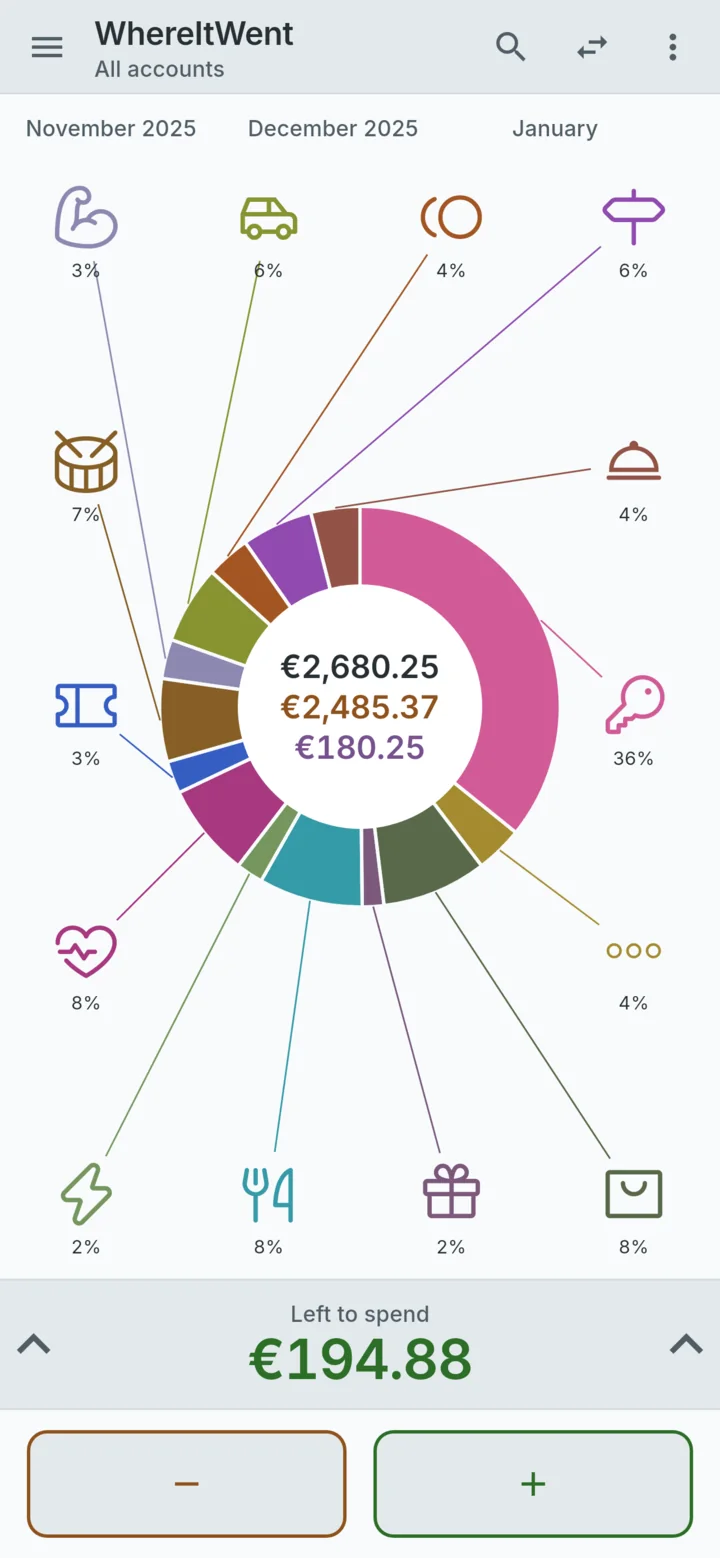
Everything else is in the same free app: a monthly budget with carry-over, several currencies with dated exchange rates, transfers between accounts, repeating records, search, a passcode lock, light and dark themes, backup and CSV export. There is no Premium tier. An optional contribution jar in Settings is how the app is paid for, and a contribution adds no features, because none are held back.
Records live in a database on your phone, and there is no WhereItWent server. The only time the app goes online is if you open the contribution jar, which asks Google Play for prices through RevenueCat, anonymously and never with your records.
Bringing your Monefy history with you
Starting from zero is the main reason people stay with an app they have outgrown. WhereItWent reads the backup file that Monefy creates on Android, so you do not have to.
- In Monefy, create a backup. Its help center gives the path as Settings → Data Backup → Create data backup.
- In WhereItWent, open Settings → Backup → Import legacy backup and pick that file.
- Check the summary of records, accounts, categories and transfers, then choose to merge it with your data or replace it.
Nothing is written until you confirm, and merge is the default. The full walkthrough, including what to check afterwards, is in how to move your Monefy data to a new app.
What you give up
- Sync between devices. Monefy can sync through Google Drive or Dropbox. WhereItWent keeps the ledger on one phone, and a backup file moves it when you change phones.
- Advanced filters. WhereItWent's search finds records by category, account or note, which covers most questions, but it is simpler than a full filter screen.
If those matter more than the subscription, staying with Monefy is a reasonable choice.
Before you switch
Keep Monefy installed until the import is done and the totals look right, and keep the backup file afterwards. If privacy was part of the reason for leaving, an offline expense tracker for your phone has a two-minute test you can run on any app. And if you are weighing up free apps in general, free expense trackers with no ads explains how each one pays for itself.
WhereItWent is an independent app and is not affiliated with Monefy or its developer, Reflective Technologies ApS.
WhereItWent has repeating records, several accounts and a budget with no subscription, and it reads your Monefy backup. Free, offline, no account, no ads.
Get WhereItWent